消息与文字
所有玩家看得到的文字都在 plugins/CloudShop/messages.yml,改完 /cs reload。
格式
- 颜色:
&a、&l、&#RRGGBB,也可以用 MiniMessage 标签(<gradient:#ffd27a:#ff9a5a>…</gradient>)。 - 你的文件里没有的键(新版本新增的)会自动用插件内置的默认文字。
prefix加在所有聊天提示的开头。
聊天提示
| 键 | 什么时候 | 可用变量 |
|---|---|---|
bought / sold | 买 / 卖成功 | {amount} {item} {price} |
sold-all / sold-nothing | 出售箱、一键卖出的结果 | {count} {price} |
sell-skipped-limited | 一键卖出略过了有限售的商品 | {count} |
sellbox-dropped | 出售箱退回时背包放不下 | |
not-enough-money | 余额不足 | {price} |
inventory-full | 背包空间不足(默认「背包空间不足,请检查背包」) | |
limit-reached / stock-empty | 达到限购 / 售罄 | |
not-enough-items | 出售时数量不够一份 | {item} {amount} |
not-for-sale / not-sellable / not-offered | 不出售 / 不回收 / 轮换已下架 | |
shop-no-permission / shop-not-here / item-no-permission / condition-failed | 没有权限、不在本服开放、不符合条件 | |
currency-unavailable / item-missing | 货币插件或物品插件没装 | {currency} / {item} |
busy / failed / cancelled | 上一笔还在处理 / 交易失败 / 被其他插件取消 | |
locked | 尚未授权 | |
sale-started / sale-stopped / sale-line / sale-broadcast | 限时特卖 | {target} {percent} {time} {by} {n} |
logs-header / logs-buy / logs-sell | /cs logs | {time} {player} {amount} {item} {price} {shop} {server} {page} {who} |
reloaded / reset-done / info | 管理指令 | {shops} {warnings} {n} |
import-* | 导入 | {shops} {items} {skipped} {kept} {backup} {folder} |
help / help-admin | /cs help | {label} |
商品说明
lore 段是自动加在商品物品说明下面的几行:
messages.yml
lore:
  header:
    - ''
  buy: '&7买入价格:&a{price}'
  buy-sale: '&7买入价格:&8&m{original}&r &a{price} &c-{percent}%'
  sale-ends: '&7特卖剩余:&f{time}'
  sell: '&7回收价格:&e{price}'
  amount: '&7每份数量:&f{amount} 个'
  trend-up: '&7行情:&c▲ {trend}'
  trend-down: '&7行情:&a▼ {trend}'
  limit: '&7限购:&f{left}&7/{max} {scope}'
  sell-limit: '&7限售:&f{left}&7/{max} {scope}'
  scope-player: '&8(每人)'
  scope-global: '&8(全服)'
  reset: ' &8· {time}后重置'
  stock: '&7库存:&f{left}&7/{max}'
  stock-empty: '&c已售罄'
  locked: '&c✖ {reason}'
  hint:
    - ''
    - '&8▸ 左键 &7购买 &8▸ Shift+左键 &7选择数量'
    - '&8▸ 右键 &7卖出 &8▸ Shift+右键 &7全部卖出'
  hint-buy: [...]     # 只能买的商品
  hint-sell: [...]    # 只能卖的商品
  hint-none: []       # 不能买也不能卖
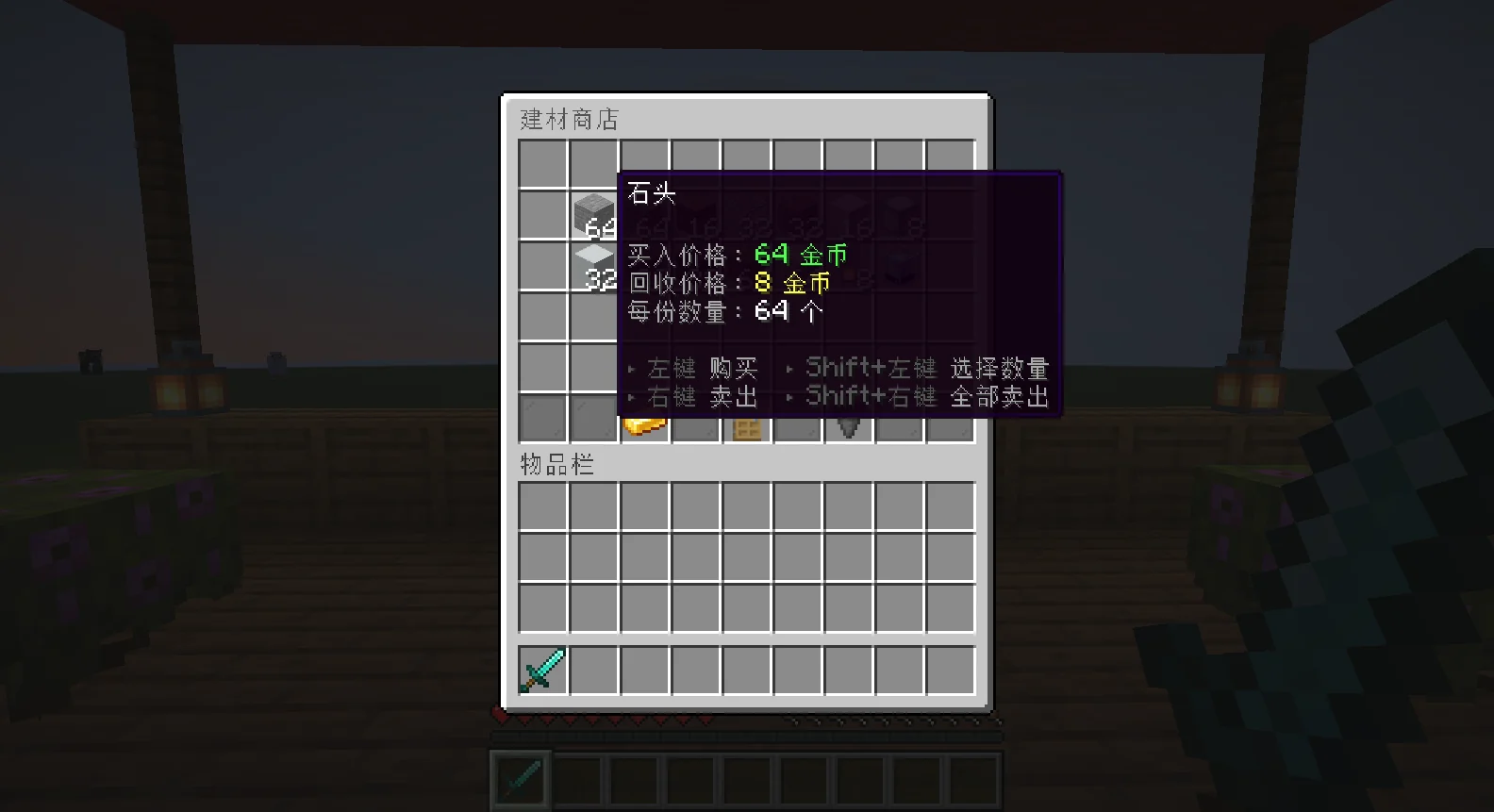
amount只在每份超过 1 个时显示;trend-*只在行情偏离原价时显示。reset接在限购、限售、库存那一行后面(有重置周期时)。locked在玩家没有权限或不符合条件时取代操作提示,{reason}是原因。- 改了
config.yml的clicks,记得一起改hint的操作说明。
玩家菜单(menu)
| 键 | 用在哪里 |
|---|---|
main-shop-lore / main-shop-sale | 主菜单商店图示下面的「共 N 件商品」、特卖标示({items} {percent}) |
rotation-empty / rotation-next | 轮换格还没有商品、底部「下次轮换」({time}) |
item-missing | 物品插件没装时的屏障名称({item}) |
qty-* | 数量选择:标题、- {n} / + {n} 按钮、「N 份(共 M 个)」、最多、确认、切换、返回 |
sellbox-* | 出售箱的「立即卖出」({count} {price})与「取消」 |
sellall-* | 一键卖出确认画面:标题、每一行({amount} {price} {shop})、确认、取消 |
管理介面(admin)
admin 段是 游戏内管理介面 的所有按钮名称、说明与聊天栏提示(ask-*)。一般不需要改;想翻译或换说法时照原本的结构修改即可。
网页编辑器(editor-*)
| 键 | 用在哪里 |
|---|---|
editor-ready / editor-link / editor-link-hover | 连结就绪、可点击的连结({minutes}) |
editor-received / editor-sum-* / editor-more | 收到网页保存时的修改摘要 |
editor-apply / editor-discard | [套用] / [放弃] 按钮 |
editor-applied / editor-apply-bad / editor-discarded | 套用结果({count} {backup} {files}) |
editor-expired / editor-closed / editor-failed / editor-disabled | 过期、关闭、连不上、已停用 |
云界面画面(cloudui)
云界面商城画面的文字默认内置,想改的话在 messages.yml 加 cloudui: 段落,键名见 云界面联动。
原版物品中文名称
聊天提示、云界面、网页编辑器里的原版物品名称来自内置的中文名称表。想修改或补充,建立 plugins/CloudShop/item-names.yml:
item-names.yml
DIAMOND: '闪亮钻石'
NETHERITE_INGOT: '下界合金'
箱子菜单里的物品名称由玩家客户端自己翻译,不受这个文件影响。